> ## Documentation Index
> Fetch the complete documentation index at: https://langchain-5e9cc07a-preview-opensw-1787674483-6bd21af.mintlify.site/llms.txt
> Use this file to discover all available pages before exploring further.
# Google Vertex AI feature integration
> Integrate with the Google Vertex AI feature vector store using LangChain Python.
> [Google Cloud Vertex Feature Store](https://cloud.google.com/vertex-ai/docs/featurestore/latest/overview) streamlines your ML feature management and online serving processes by letting you serve at low-latency your data in [Google Cloud BigQuery](https://cloud.google.com/bigquery?hl=en), including the capacity to perform approximate neighbor retrieval for embeddings
This tutorial shows you how to easily perform low-latency vector search and approximate nearest neighbor retrieval directly from your BigQuery data, enabling powerful ML applications with minimal setup. We will do that using the `VertexFSVectorStore` class.
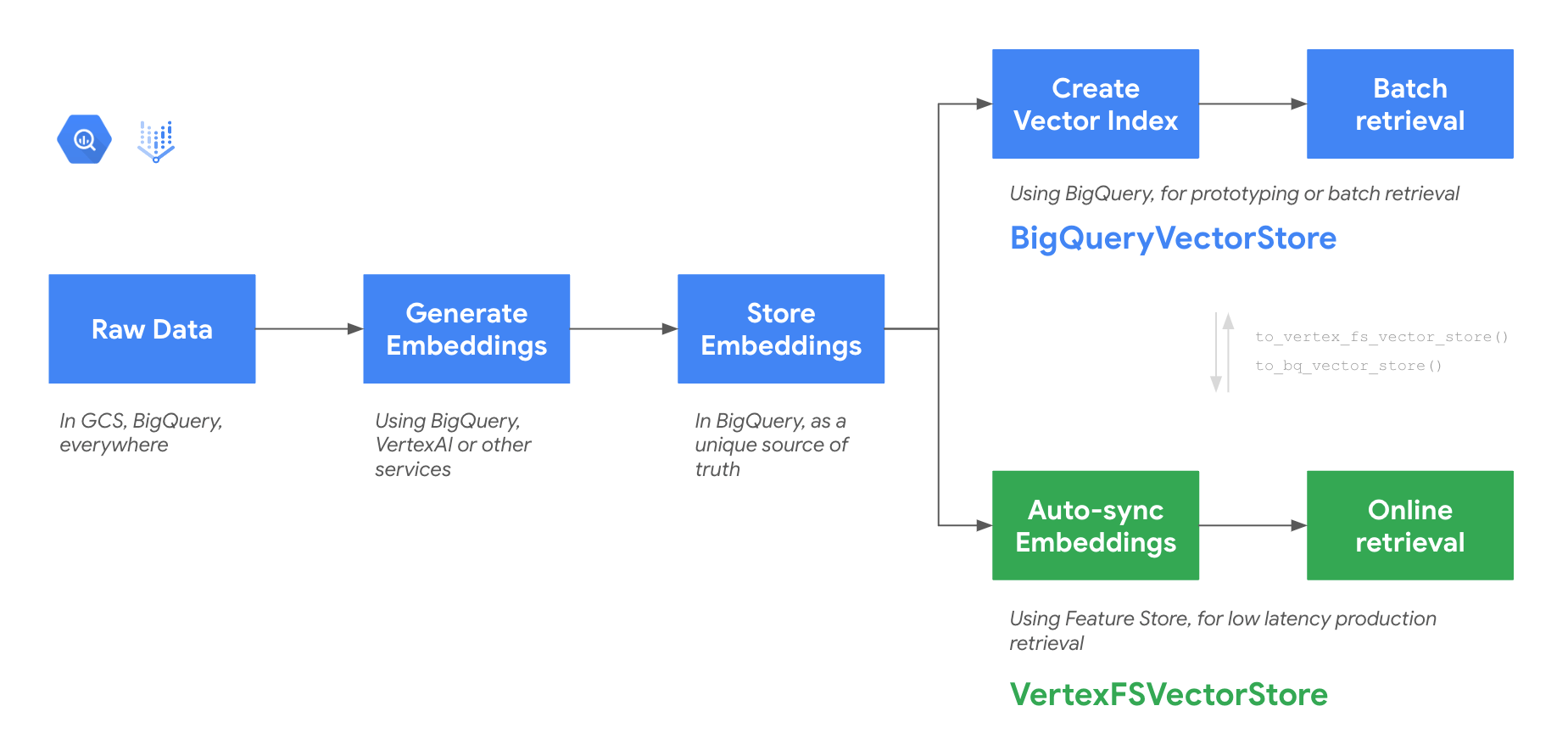
This class is part of a set of 2 classes capable of providing a unified data storage and flexible vector search in Google Cloud:
* **BigQuery Vector Search**: with `BigQueryVectorStore` class, which is ideal for rapid prototyping with no infrastructure setup and batch retrieval.
* **Feature Store Online Store**: with `VertexFSVectorStore` class, enables low-latency retrieval with manual or scheduled data sync. Perfect for production-ready user-facing GenAI applications.
 ## Getting started
### Install the library
```python theme={null}
pip install -qU langchain langchain-google-vertexai "langchain-google-community[featurestore]"
```
To use the newly installed packages in this Jupyter runtime, you must restart the runtime. You can do this by running the cell below, which restarts the current kernel.
```python theme={null}
import IPython
app = IPython.Application.instance()
app.kernel.do_shutdown(True)
```
## Before you begin
#### Set your project ID
If you don't know your project ID, try the following:
* Run `gcloud config list`.
* Run `gcloud projects list`.
* See the support page: [Locate the project ID](https://support.google.com/googleapi/answer/7014113).
```python theme={null}
PROJECT_ID = "" # @param {type:"string"}
# Set the project id
! gcloud config set project {PROJECT_ID}
```
#### Set the region
You can also change the `REGION` variable used by BigQuery. Learn more about [BigQuery regions](https://cloud.google.com/bigquery/docs/locations#supported_locations).
```python theme={null}
REGION = "us-central1" # @param {type: "string"}
```
#### Set the dataset and table names
They will be your BigQuery Vector Store.
```python theme={null}
DATASET = "my_langchain_dataset" # @param {type: "string"}
TABLE = "doc_and_vectors" # @param {type: "string"}
```
### Authenticating your notebook environment
* If you are using **Colab** to run this notebook, uncomment the cell below and continue.
* If you are using **Vertex AI Workbench**, check out the [Vertex AI Workbench setup instructions](https://github.com/GoogleCloudPlatform/generative-ai/tree/main/setup-env).
```python theme={null}
# from google.colab import auth as google_auth
# google_auth.authenticate_user()
```
## Demo: VertexFSVectorStore
### Create an embedding class instance
You may need to enable Vertex AI API in your project by running
`gcloud services enable aiplatform.googleapis.com --project {PROJECT_ID}`
(replace `{PROJECT_ID}` with the name of your project).
You can use any [LangChain embeddings model](/oss/python/integrations/embeddings/).
```python theme={null}
from langchain_google_vertexai import VertexAIEmbeddings
embedding = VertexAIEmbeddings(
model_name="textembedding-gecko@latest", project=PROJECT_ID
)
```
### Initialize VertexFSVectorStore
BigQuery Dataset and Table will be automatically created if they do not exist. See the [class definition](https://github.com/langchain-ai/langchain-google/blob/main/libs/community/langchain_google_community/bq_storage_vectorstores/featurestore.py#L33) for all optional parameters.
```python theme={null}
from langchain_google_community import VertexFSVectorStore
store = VertexFSVectorStore(
project_id=PROJECT_ID,
dataset_name=DATASET,
table_name=TABLE,
location=REGION,
embedding=embedding,
)
```
### Add texts
> Note: The first synchronization process will take around \~20 minutes because of Feature Online Store creation.
```python theme={null}
all_texts = ["Apples and oranges", "Cars and airplanes", "Pineapple", "Train", "Banana"]
metadatas = [{"len": len(t)} for t in all_texts]
store.add_texts(all_texts, metadatas=metadatas)
```
You can also start a sync on demand by executing the `sync_data` method.
```python theme={null}
store.sync_data()
```
When in a production environment, you can also use `cron_schedule` class parameter to setup an automatic scheduled synchronization.
For example:
```python theme={null}
store = VertexFSVectorStore(cron_schedule="TZ=America/Los_Angeles 00 13 11 8 *", ...)
```
### Search for documents
```python theme={null}
query = "I'd like a fruit."
docs = store.similarity_search(query)
print(docs)
```
### Search for documents by vector
```python theme={null}
query_vector = embedding.embed_query(query)
docs = store.similarity_search_by_vector(query_vector, k=2)
print(docs)
```
### Search for documents with metadata filter
```python theme={null}
# This should only return "Banana" document.
docs = store.similarity_search_by_vector(query_vector, filter={"len": 6})
print(docs)
```
### Add text with embeddings
You can also bring your own embeddings with the`add_texts_with_embeddings` method.
This is particularly useful for multimodal data which might require custom preprocessing before the embedding generation.
```python theme={null}
items = ["some text"]
embs = embedding.embed(items)
ids = store.add_texts_with_embeddings(
texts=["some text"], embs=embs, metadatas=[{"len": 1}]
)
```
### Batch serving with BigQuery
You can simply use the method `.to_bq_vector_store()` to get a BigQueryVectorStore object, which offers optimized performances for batch use cases. All mandatory parameters will be automatically transferred from the existing class. See the [class definition](https://github.com/langchain-ai/langchain-google/blob/main/libs/community/langchain_google_community/bq_storage_vectorstores/bigquery.py#L26) for all the parameters you can use.
Moving back to BigQueryVectorStore is equivalently easy with the `.to_vertex_fs_vector_store()` method.
```python theme={null}
store.to_bq_vector_store() # pass optional VertexFSVectorStore parameters as arguments
```
***
## Getting started
### Install the library
```python theme={null}
pip install -qU langchain langchain-google-vertexai "langchain-google-community[featurestore]"
```
To use the newly installed packages in this Jupyter runtime, you must restart the runtime. You can do this by running the cell below, which restarts the current kernel.
```python theme={null}
import IPython
app = IPython.Application.instance()
app.kernel.do_shutdown(True)
```
## Before you begin
#### Set your project ID
If you don't know your project ID, try the following:
* Run `gcloud config list`.
* Run `gcloud projects list`.
* See the support page: [Locate the project ID](https://support.google.com/googleapi/answer/7014113).
```python theme={null}
PROJECT_ID = "" # @param {type:"string"}
# Set the project id
! gcloud config set project {PROJECT_ID}
```
#### Set the region
You can also change the `REGION` variable used by BigQuery. Learn more about [BigQuery regions](https://cloud.google.com/bigquery/docs/locations#supported_locations).
```python theme={null}
REGION = "us-central1" # @param {type: "string"}
```
#### Set the dataset and table names
They will be your BigQuery Vector Store.
```python theme={null}
DATASET = "my_langchain_dataset" # @param {type: "string"}
TABLE = "doc_and_vectors" # @param {type: "string"}
```
### Authenticating your notebook environment
* If you are using **Colab** to run this notebook, uncomment the cell below and continue.
* If you are using **Vertex AI Workbench**, check out the [Vertex AI Workbench setup instructions](https://github.com/GoogleCloudPlatform/generative-ai/tree/main/setup-env).
```python theme={null}
# from google.colab import auth as google_auth
# google_auth.authenticate_user()
```
## Demo: VertexFSVectorStore
### Create an embedding class instance
You may need to enable Vertex AI API in your project by running
`gcloud services enable aiplatform.googleapis.com --project {PROJECT_ID}`
(replace `{PROJECT_ID}` with the name of your project).
You can use any [LangChain embeddings model](/oss/python/integrations/embeddings/).
```python theme={null}
from langchain_google_vertexai import VertexAIEmbeddings
embedding = VertexAIEmbeddings(
model_name="textembedding-gecko@latest", project=PROJECT_ID
)
```
### Initialize VertexFSVectorStore
BigQuery Dataset and Table will be automatically created if they do not exist. See the [class definition](https://github.com/langchain-ai/langchain-google/blob/main/libs/community/langchain_google_community/bq_storage_vectorstores/featurestore.py#L33) for all optional parameters.
```python theme={null}
from langchain_google_community import VertexFSVectorStore
store = VertexFSVectorStore(
project_id=PROJECT_ID,
dataset_name=DATASET,
table_name=TABLE,
location=REGION,
embedding=embedding,
)
```
### Add texts
> Note: The first synchronization process will take around \~20 minutes because of Feature Online Store creation.
```python theme={null}
all_texts = ["Apples and oranges", "Cars and airplanes", "Pineapple", "Train", "Banana"]
metadatas = [{"len": len(t)} for t in all_texts]
store.add_texts(all_texts, metadatas=metadatas)
```
You can also start a sync on demand by executing the `sync_data` method.
```python theme={null}
store.sync_data()
```
When in a production environment, you can also use `cron_schedule` class parameter to setup an automatic scheduled synchronization.
For example:
```python theme={null}
store = VertexFSVectorStore(cron_schedule="TZ=America/Los_Angeles 00 13 11 8 *", ...)
```
### Search for documents
```python theme={null}
query = "I'd like a fruit."
docs = store.similarity_search(query)
print(docs)
```
### Search for documents by vector
```python theme={null}
query_vector = embedding.embed_query(query)
docs = store.similarity_search_by_vector(query_vector, k=2)
print(docs)
```
### Search for documents with metadata filter
```python theme={null}
# This should only return "Banana" document.
docs = store.similarity_search_by_vector(query_vector, filter={"len": 6})
print(docs)
```
### Add text with embeddings
You can also bring your own embeddings with the`add_texts_with_embeddings` method.
This is particularly useful for multimodal data which might require custom preprocessing before the embedding generation.
```python theme={null}
items = ["some text"]
embs = embedding.embed(items)
ids = store.add_texts_with_embeddings(
texts=["some text"], embs=embs, metadatas=[{"len": 1}]
)
```
### Batch serving with BigQuery
You can simply use the method `.to_bq_vector_store()` to get a BigQueryVectorStore object, which offers optimized performances for batch use cases. All mandatory parameters will be automatically transferred from the existing class. See the [class definition](https://github.com/langchain-ai/langchain-google/blob/main/libs/community/langchain_google_community/bq_storage_vectorstores/bigquery.py#L26) for all the parameters you can use.
Moving back to BigQueryVectorStore is equivalently easy with the `.to_vertex_fs_vector_store()` method.
```python theme={null}
store.to_bq_vector_store() # pass optional VertexFSVectorStore parameters as arguments
```
***
[Connect these docs](/use-these-docs) to Claude, VSCode, and more via MCP for real-time answers.
[Edit this page on GitHub](https://github.com/langchain-ai/docs/edit/main/src/oss/python/integrations/vectorstores/google_vertex_ai_feature_store.mdx) or [file an issue](https://github.com/langchain-ai/docs/issues/new/choose).