> ## Documentation Index
> Fetch the complete documentation index at: https://langchain-5e9cc07a-preview-opensw-1787674483-6bd21af.mintlify.site/llms.txt
> Use this file to discover all available pages before exploring further.
# Google bigquery vector search integration
> Integrate with the Google bigquery vector search vector store using LangChain Python.
> [Google Cloud BigQuery Vector Search](https://cloud.google.com/bigquery/docs/vector-search-intro) lets you use GoogleSQL to do semantic search, using vector indexes for fast approximate results, or using brute force for exact results.
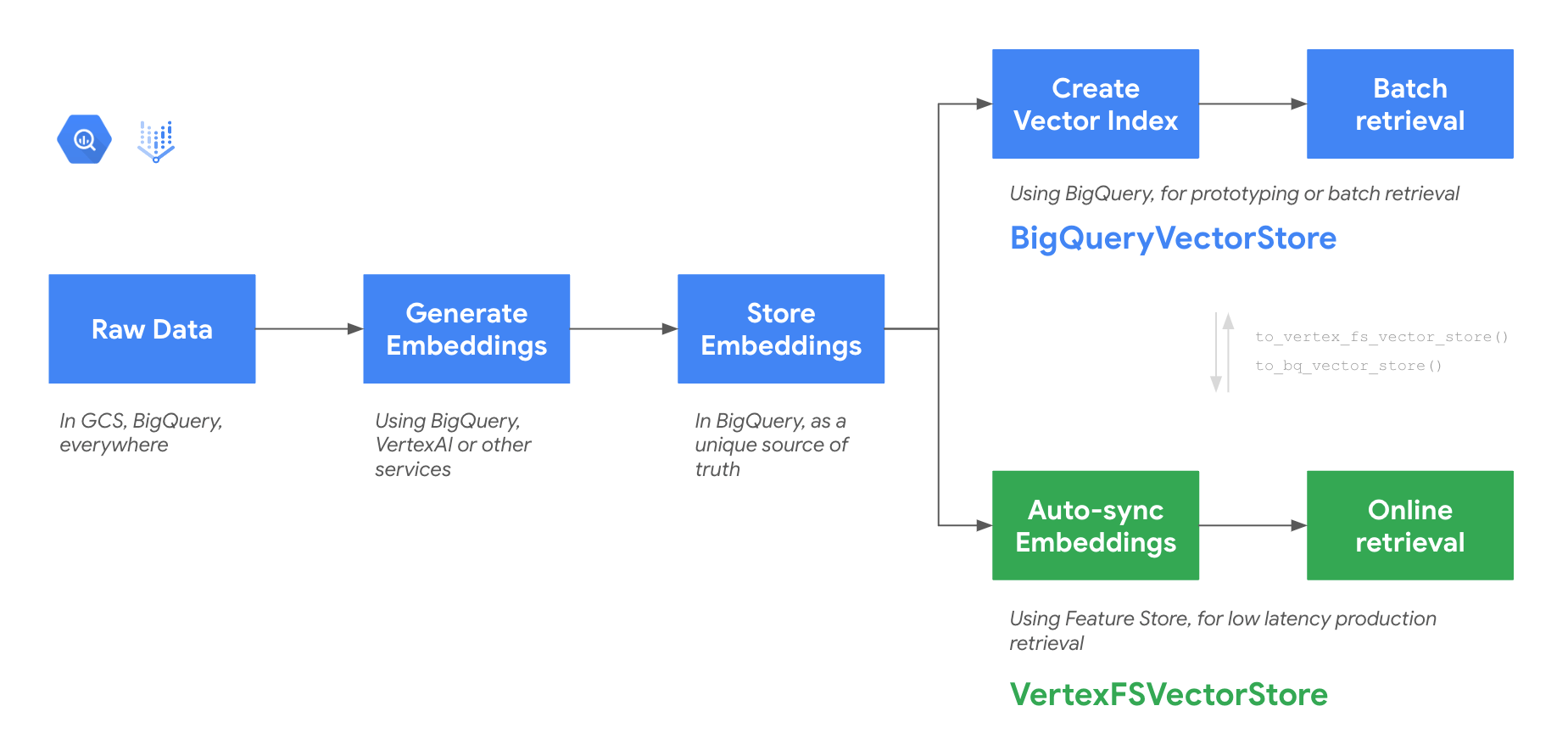
This tutorial illustrates how to work with an end-to-end data and embedding management system in LangChain, and provides a scalable semantic search in BigQuery using the`BigQueryVectorStore` class. This class is part of a set of 2 classes capable of providing a unified data storage and flexible vector search in Google Cloud:
* **BigQuery Vector Search**: with `BigQueryVectorStore` class, which is ideal for rapid prototyping with no infrastructure setup and batch retrieval.
* **Feature Store Online Store**: with `VertexFSVectorStore` class, enables low-latency retrieval with manual or scheduled data sync. Perfect for production-ready user-facing GenAI applications.
 ## Getting started
### Install the library
```python theme={null}
pip install -qU langchain langchain-google-vertexai "langchain-google-community[featurestore]"
```
To use the newly installed packages in this Jupyter runtime, you must restart the runtime. You can do this by running the cell below, which restarts the current kernel.
```python theme={null}
import IPython
app = IPython.Application.instance()
app.kernel.do_shutdown(True)
```
## Before you begin
#### Set your project ID
If you don't know your project ID, try the following:
* Run `gcloud config list`.
* Run `gcloud projects list`.
* See the support page: [Locate the project ID](https://support.google.com/googleapi/answer/7014113).
```python theme={null}
PROJECT_ID = "" # @param {type:"string"}
# Set the project id
! gcloud config set project {PROJECT_ID}
```
#### Set the region
You can also change the `REGION` variable used by BigQuery. Learn more about [BigQuery regions](https://cloud.google.com/bigquery/docs/locations#supported_locations).
```python theme={null}
REGION = "us-central1" # @param {type: "string"}
```
#### Set the dataset and table names
They will be your BigQuery Vector Store.
```python theme={null}
DATASET = "my_langchain_dataset" # @param {type: "string"}
TABLE = "doc_and_vectors" # @param {type: "string"}
```
### Authenticating your notebook environment
* If you are using **Colab** to run this notebook, uncomment the cell below and continue.
* If you are using **Vertex AI Workbench**, check out the [Vertex AI Workbench setup instructions](https://github.com/GoogleCloudPlatform/generative-ai/tree/main/setup-env).
```python theme={null}
# from google.colab import auth as google_auth
# google_auth.authenticate_user()
```
## Demo: BigQueryVectorStore
### Create an embedding class instance
You may need to enable Vertex AI API in your project by running
`gcloud services enable aiplatform.googleapis.com --project {PROJECT_ID}`
(replace `{PROJECT_ID}` with the name of your project).
You can use any [LangChain embeddings model](/oss/python/integrations/embeddings/).
```python theme={null}
from langchain_google_vertexai import VertexAIEmbeddings
embedding = VertexAIEmbeddings(
model_name="textembedding-gecko@latest", project=PROJECT_ID
)
```
### Initialize BigQueryVectorStore
BigQuery Dataset and Table will be automatically created if they do not exist. See the [class definition](https://github.com/langchain-ai/langchain-google/blob/main/libs/community/langchain_google_community/bq_storage_vectorstores/bigquery.py#L26) for all optional paremeters.
```python theme={null}
from langchain_google_community import BigQueryVectorStore
store = BigQueryVectorStore(
project_id=PROJECT_ID,
dataset_name=DATASET,
table_name=TABLE,
location=REGION,
embedding=embedding,
)
```
### Add texts
```python theme={null}
all_texts = ["Apples and oranges", "Cars and airplanes", "Pineapple", "Train", "Banana"]
metadatas = [{"len": len(t)} for t in all_texts]
store.add_texts(all_texts, metadatas=metadatas)
```
### Search for documents
```python theme={null}
query = "I'd like a fruit."
docs = store.similarity_search(query)
print(docs)
```
### Search for documents by vector
```python theme={null}
query_vector = embedding.embed_query(query)
docs = store.similarity_search_by_vector(query_vector, k=2)
print(docs)
```
### Searching documents with metadata filters
The vectorstore supports two methods for applying filters to metadata fields when performing document searches:
* Dictionary-based Filters
* You can pass a dictionary (dict) where the keys represent metadata fields and the values specify the filter condition. This method applies an equality filter between the key and the corresponding value. When multiple key-value pairs are provided, they are combined using a logical AND operation.
* SQL-based Filters
* Alternatively, you can provide a string representing an SQL WHERE clause to define more complex filtering conditions. This allows for greater flexibility, supporting SQL expressions such as comparison operators and logical operators. Learn more about [BigQuery operators](https://cloud.google.com/bigquery/docs/reference/standard-sql/operators).
```python theme={null}
# Dictionary-based Filters
# This should only return "Banana" document.
docs = store.similarity_search_by_vector(query_vector, filter={"len": 6})
print(docs)
```
```python theme={null}
# SQL-based Filters
# This should return "Banana", "Apples and oranges" and "Cars and airplanes" documents.
docs = store.similarity_search_by_vector(query_vector, filter="len = 6 AND len > 17")
print(docs)
```
### Batch search
BigQueryVectorStore offers a `batch_search` method for scalable Vector similarity search.
```python theme={null}
results = store.batch_search(
embeddings=None, # can pass embeddings or
queries=["search_query", "search_query"], # can pass queries
)
```
### Add text with embeddings
You can also bring your own embeddings with the `add_texts_with_embeddings` method.
This is particularly useful for multimodal data which might require custom preprocessing before the embedding generation.
```python theme={null}
items = ["some text"]
embs = embedding.embed(items)
ids = store.add_texts_with_embeddings(
texts=["some text"], embs=embs, metadatas=[{"len": 1}]
)
```
### Low-latency serving with feature store
You can simply use the method `.to_vertex_fs_vector_store()` to get a VertexFSVectorStore object, which offers low latency for online use cases. All mandatory parameters will be automatically transferred from the existing BigQueryVectorStore class. See the [class definition](https://github.com/langchain-ai/langchain-google/blob/main/libs/community/langchain_google_community/bq_storage_vectorstores/featurestore.py#L33) for all the other parameters you can use.
Moving back to BigQueryVectorStore is equivalently easy with the `.to_bq_vector_store()` method.
```python theme={null}
store.to_vertex_fs_vector_store() # pass optional VertexFSVectorStore parameters as arguments
```
***
## Getting started
### Install the library
```python theme={null}
pip install -qU langchain langchain-google-vertexai "langchain-google-community[featurestore]"
```
To use the newly installed packages in this Jupyter runtime, you must restart the runtime. You can do this by running the cell below, which restarts the current kernel.
```python theme={null}
import IPython
app = IPython.Application.instance()
app.kernel.do_shutdown(True)
```
## Before you begin
#### Set your project ID
If you don't know your project ID, try the following:
* Run `gcloud config list`.
* Run `gcloud projects list`.
* See the support page: [Locate the project ID](https://support.google.com/googleapi/answer/7014113).
```python theme={null}
PROJECT_ID = "" # @param {type:"string"}
# Set the project id
! gcloud config set project {PROJECT_ID}
```
#### Set the region
You can also change the `REGION` variable used by BigQuery. Learn more about [BigQuery regions](https://cloud.google.com/bigquery/docs/locations#supported_locations).
```python theme={null}
REGION = "us-central1" # @param {type: "string"}
```
#### Set the dataset and table names
They will be your BigQuery Vector Store.
```python theme={null}
DATASET = "my_langchain_dataset" # @param {type: "string"}
TABLE = "doc_and_vectors" # @param {type: "string"}
```
### Authenticating your notebook environment
* If you are using **Colab** to run this notebook, uncomment the cell below and continue.
* If you are using **Vertex AI Workbench**, check out the [Vertex AI Workbench setup instructions](https://github.com/GoogleCloudPlatform/generative-ai/tree/main/setup-env).
```python theme={null}
# from google.colab import auth as google_auth
# google_auth.authenticate_user()
```
## Demo: BigQueryVectorStore
### Create an embedding class instance
You may need to enable Vertex AI API in your project by running
`gcloud services enable aiplatform.googleapis.com --project {PROJECT_ID}`
(replace `{PROJECT_ID}` with the name of your project).
You can use any [LangChain embeddings model](/oss/python/integrations/embeddings/).
```python theme={null}
from langchain_google_vertexai import VertexAIEmbeddings
embedding = VertexAIEmbeddings(
model_name="textembedding-gecko@latest", project=PROJECT_ID
)
```
### Initialize BigQueryVectorStore
BigQuery Dataset and Table will be automatically created if they do not exist. See the [class definition](https://github.com/langchain-ai/langchain-google/blob/main/libs/community/langchain_google_community/bq_storage_vectorstores/bigquery.py#L26) for all optional paremeters.
```python theme={null}
from langchain_google_community import BigQueryVectorStore
store = BigQueryVectorStore(
project_id=PROJECT_ID,
dataset_name=DATASET,
table_name=TABLE,
location=REGION,
embedding=embedding,
)
```
### Add texts
```python theme={null}
all_texts = ["Apples and oranges", "Cars and airplanes", "Pineapple", "Train", "Banana"]
metadatas = [{"len": len(t)} for t in all_texts]
store.add_texts(all_texts, metadatas=metadatas)
```
### Search for documents
```python theme={null}
query = "I'd like a fruit."
docs = store.similarity_search(query)
print(docs)
```
### Search for documents by vector
```python theme={null}
query_vector = embedding.embed_query(query)
docs = store.similarity_search_by_vector(query_vector, k=2)
print(docs)
```
### Searching documents with metadata filters
The vectorstore supports two methods for applying filters to metadata fields when performing document searches:
* Dictionary-based Filters
* You can pass a dictionary (dict) where the keys represent metadata fields and the values specify the filter condition. This method applies an equality filter between the key and the corresponding value. When multiple key-value pairs are provided, they are combined using a logical AND operation.
* SQL-based Filters
* Alternatively, you can provide a string representing an SQL WHERE clause to define more complex filtering conditions. This allows for greater flexibility, supporting SQL expressions such as comparison operators and logical operators. Learn more about [BigQuery operators](https://cloud.google.com/bigquery/docs/reference/standard-sql/operators).
```python theme={null}
# Dictionary-based Filters
# This should only return "Banana" document.
docs = store.similarity_search_by_vector(query_vector, filter={"len": 6})
print(docs)
```
```python theme={null}
# SQL-based Filters
# This should return "Banana", "Apples and oranges" and "Cars and airplanes" documents.
docs = store.similarity_search_by_vector(query_vector, filter="len = 6 AND len > 17")
print(docs)
```
### Batch search
BigQueryVectorStore offers a `batch_search` method for scalable Vector similarity search.
```python theme={null}
results = store.batch_search(
embeddings=None, # can pass embeddings or
queries=["search_query", "search_query"], # can pass queries
)
```
### Add text with embeddings
You can also bring your own embeddings with the `add_texts_with_embeddings` method.
This is particularly useful for multimodal data which might require custom preprocessing before the embedding generation.
```python theme={null}
items = ["some text"]
embs = embedding.embed(items)
ids = store.add_texts_with_embeddings(
texts=["some text"], embs=embs, metadatas=[{"len": 1}]
)
```
### Low-latency serving with feature store
You can simply use the method `.to_vertex_fs_vector_store()` to get a VertexFSVectorStore object, which offers low latency for online use cases. All mandatory parameters will be automatically transferred from the existing BigQueryVectorStore class. See the [class definition](https://github.com/langchain-ai/langchain-google/blob/main/libs/community/langchain_google_community/bq_storage_vectorstores/featurestore.py#L33) for all the other parameters you can use.
Moving back to BigQueryVectorStore is equivalently easy with the `.to_bq_vector_store()` method.
```python theme={null}
store.to_vertex_fs_vector_store() # pass optional VertexFSVectorStore parameters as arguments
```
***
[Connect these docs](/use-these-docs) to Claude, VSCode, and more via MCP for real-time answers.
[Edit this page on GitHub](https://github.com/langchain-ai/docs/edit/main/src/oss/python/integrations/vectorstores/google_bigquery_vector_search.mdx) or [file an issue](https://github.com/langchain-ai/docs/issues/new/choose).